Packaging with flet pack
Instructions for packaging a Flet app into a standalone desktop executable
with flet pack — a lightweight,
PyInstaller-based alternative to
flet build. Users can run the packaged app without
installing a Python interpreter or any modules.
How it relates to flet build
Both commands are supported — they occupy different points on the speed-vs-control curve:
flet pack | flet build | |
|---|---|---|
| Targets | Desktop only: Windows, macOS, Linux | Desktop, mobile (Android/iOS), and web |
| Toolchain | PyInstaller | Flutter SDK (auto-installed) |
| How the app runs | Your Python code alongside the prebuilt Flet desktop client | Flutter-compiled app with Python embedded, running in-process |
| Build time | Fast — no native compilation | Slower — a full Flutter build |
| Customization | Icon and executable/bundle metadata | Everything: icons, splash, build template, signing and store packaging |
Reach for flet pack when you want a desktop artifact quickly; use
flet build when you target mobile or web, or need deeper
customization.
Like PyInstaller itself, flet pack is not a cross-compiler: run it on each
OS you target — CI makes this painless.
Prerequisites
PyInstaller powers the packaging and must be installed first:
pip install pyinstaller
Packaging
From the directory containing your program, run:
flet pack your_program.py
The packaged app lands in the dist folder
(--distpath changes that): a single-file executable
on Windows and Linux, or a .app bundle on macOS. Pass
--onedir for a one-folder bundle instead of a
single file (macOS always produces a .app bundle). Try running it:
- macOS
- Windows
- Linux
open dist/your_program.app
dist\your_program.exe
dist/your_program
By default the executable or bundle is named after the Python script; change
it with --name:
flet pack your_program.py --name bundle_name
If non-empty build or dist folders remain from a previous run,
flet pack asks before deleting them — pass --yes to skip all prompts
(useful in CI).
To distribute, zip the contents of the dist folder and hand it to your
users — they don't need Python or Flet installed to run it.
Custom icon
Set the icon with --icon:
flet pack your_program.py --icon your-icon.ico
Provide the icon in the target platform's native format: .ico on Windows,
.icns on macOS, and .png on Linux. It is applied both to the outer
executable and to the embedded Flet viewer, so the app window, Dock/taskbar
entries, and the executable itself all match.
Including assets
If your app uses assets, include them with
--add-data, in the form source:destination:
flet pack your_program.py --add-data "assets:assets"
The option can be repeated to include multiple files or folders.
Executable and bundle metadata
Details shown by the OS about your app can be customized.
On macOS — the "About" dialog and Dock/Activity Monitor entries of the bundle:
--product-name— display name of the bundle.--product-version— version shown in the "About" dialog.--copyright— copyright notice shown in the "About" dialog.--bundle-id— unique bundle identifier.
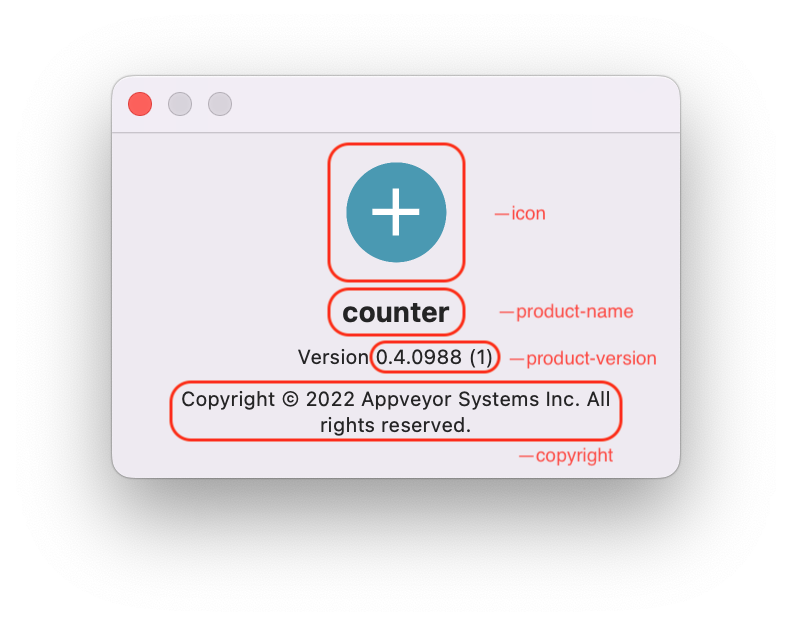
On Windows — the executable's "Details" properties dialog:
--product-name— "Product name" field.--product-version— "Product version" field.--file-version— "File version" field, inn.n.n.nformat.--file-description— "File description" field, also the program's display name in Task Manager.--company-name— "Company name" field.--copyright— "Copyright" field.
Like the icon, the metadata is embedded into both the outer executable and the Flet viewer inside it.
More options
--hidden-import— add modules that are imported dynamically and therefore missed by PyInstaller's static analysis.--add-binary— bundle additional binary files.--debug-console1— keep a console window with Python output open, for troubleshooting the packaged app.--uac-admin— request elevated permissions on start (Windows).--codesign-identity— sign the app bundle (macOS).--pyinstaller-build-args— pass any other argument straight through to the underlyingpyinstallercommand.
The full option list is in the flet pack reference.
Packaging in CI
Since each OS must package its own artifact, a CI matrix produces all three in one go:
name: Pack Flet App

on:
  push:
  workflow_dispatch:

jobs:
  pack:
    name: Pack on ${{ matrix.os }}
    runs-on: ${{ matrix.os }}
    strategy:
      fail-fast: false
      matrix:
        os: [windows-latest, macos-latest, ubuntu-latest]

    steps:
      - name: Checkout repository
        uses: actions/checkout@v6

      - name: Setup Python
        uses: actions/setup-python@v6
        with:
          python-version: "3.14"

      - name: Install dependencies
        run: pip install flet pyinstaller

      - name: Pack app
        run: flet pack your_program.py --yes

      - name: Upload artifact
        uses: actions/upload-artifact@v7
        with:
          name: your_program-${{ matrix.os }}
          path: dist
Troubleshooting
| Symptom | Cause and fix |
|---|---|
ModuleNotFoundError inside the packaged app only | The module is imported dynamically, so PyInstaller's static analysis missed it — repackage with --hidden-import <module>. |
| The packaged app exits or misbehaves with no visible error | Repackage with --debug-console 1 to get a console window showing Python output and tracebacks. |
macOS: "App" is damaged and can't be opened on other Macs | Downloaded apps must be signed and notarized for Gatekeeper to run them. Sign the bundle with --codesign-identity, then notarize and staple it — the Notarization section explains the concepts and commands, which apply to any signed app. flet build macos automates this entire chain. |